Plumia

A blog that researches, writes and promotes itself.

Type a subject. Plumia builds the blog in about ten minutes. With a plan, it then writes and publishes on a schedule.

Free preview: the blog and its first three articles. Sign-up takes a name, an email and a password. No card.

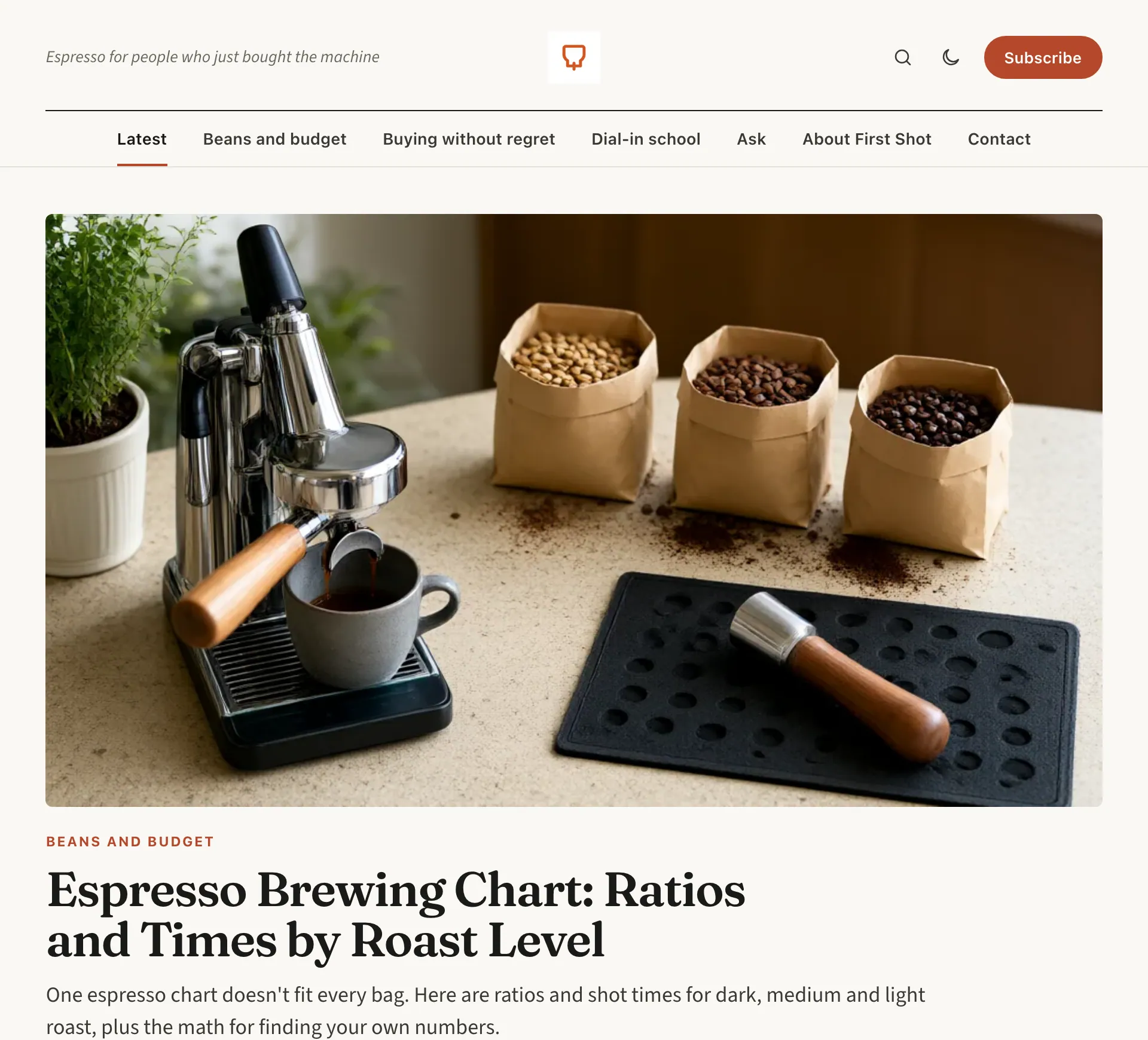
The home page of First Shot, a blog about home espresso for beginners that Plumia built from the subject alone: its logo, its tagline, the menu and the lead article with its cover picture and headline.
The same blog on a phone: the header, the lead article with its cover and the start of the list of articles.
First Shot, a blog Plumia built from the subject “home espresso for beginners”. A real capture, not edited.

Watch a real build, start to finish

This is the recorded activity of one build on 6 November 2026, replayed at up to 30 times its speed. The only input was the subject “home espresso for beginners”. From the first step to a live blog took 5 minutes 21 seconds.

  1. Started building a blog about home espresso for beginners
  2. Researching the niche
  3. Designing brand and strategy
  4. Brand: First Shot
  5. Drawing the logo
  6. Researching keywords and article ideas
  7. Writing article 1: Sour or Bitter? An Espresso Taste Chart for Shots You Cannot Diagnose by Smell
  8. First article published: “Sour or Bitter? An Espresso Taste Chart You Can Actually Use”
  9. Writing articles 2 and 3 in parallel
  10. Scheduled 13 recurring tasks (paused until billing is active)
  11. First Shot is live

Naming the blog


6 topicsBuying without regret, Dial-in school, Workflow and cleanup, Milk and drinks, Beans and budget, Upgrade timing

13 search phraseswith monthly searches and difficulty

8 article ideasplanned in this build

3 pagesAbout First Shot, Contact, Privacy policy

  • Article 1

  • Article 2

  • Article 3

13 recurring tasks scheduled. They start when you choose a plan.

You give a subject. Plumia does the rest.

The only thing Plumia asks about your blog is its subject. After that you read, approve or change whatever you like.

  1. Say what it is about

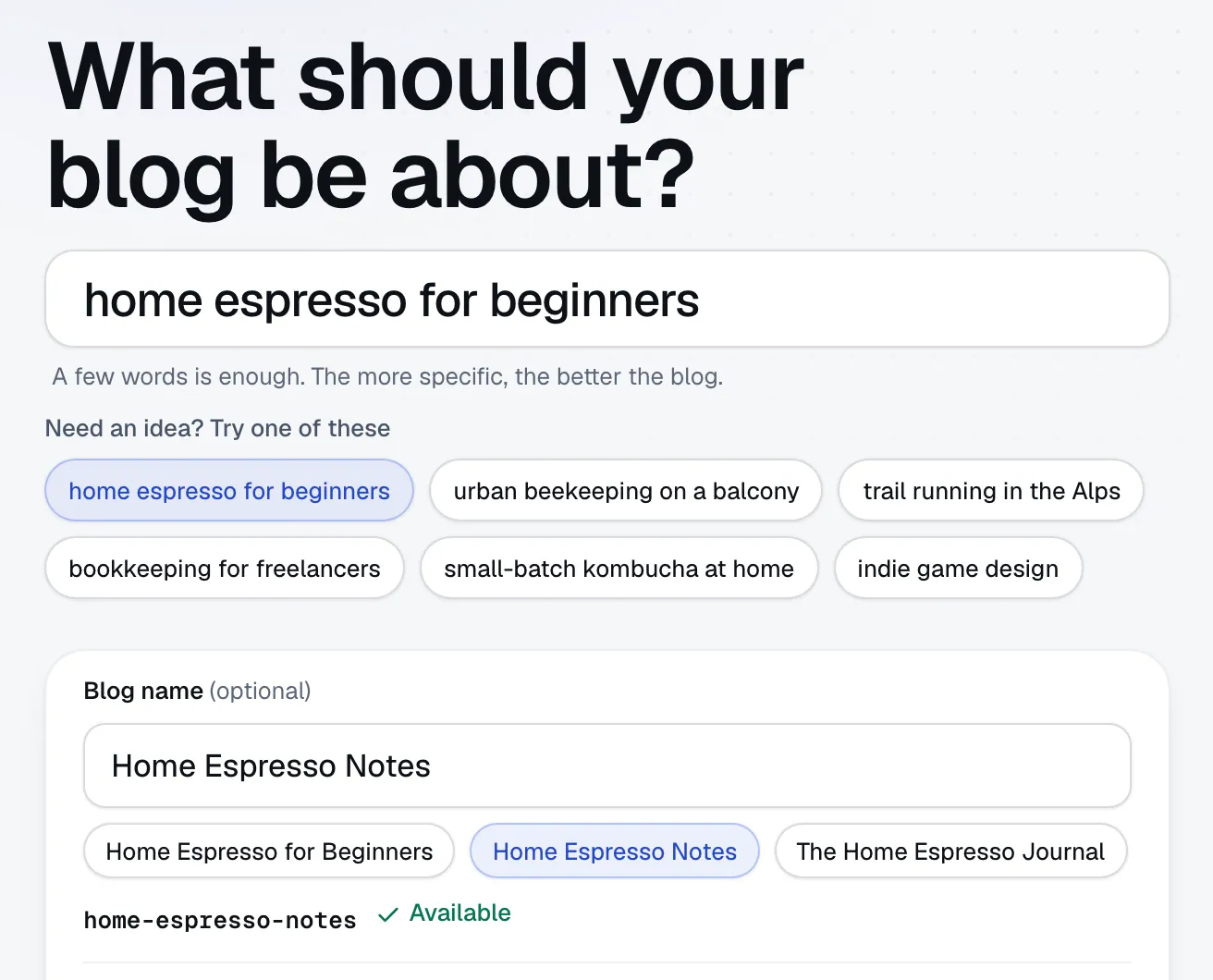
    Type a subject, or tap an example. The title is optional: Plumia suggests a few names and tells you while you type whether the address is free. Leave it empty and Plumia picks one. Signing up takes a name, an email and a password. No card.

    The Plumia start page: the question “What should your blog be about?”, the subject typed in one field with six example subjects under it, and an optional blog name with name ideas made from the subject and a line that says its address is available.
  2. Plumia builds the blog

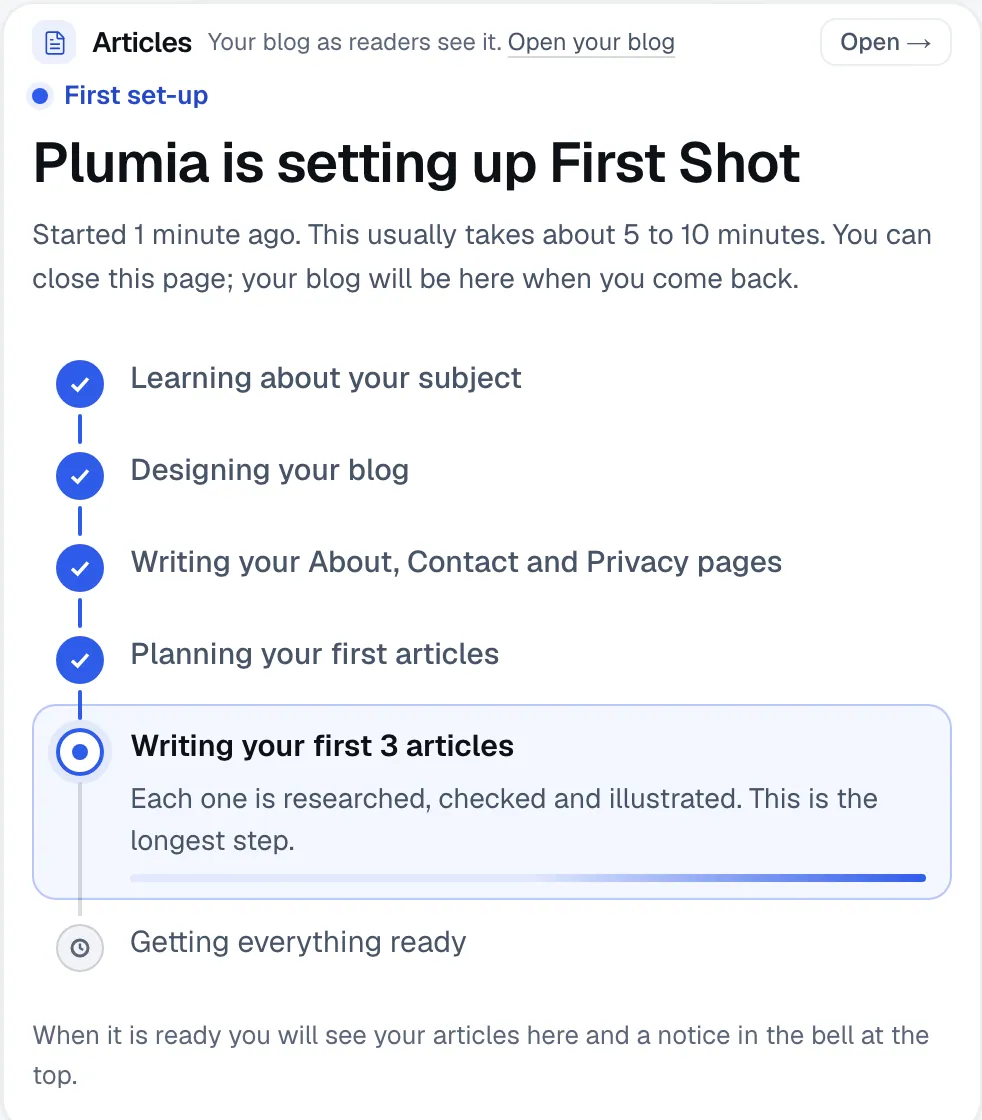
    In about ten minutes it learns the subject, designs the brand and the logo, plans the topics and the search phrases, writes the About, Contact and Privacy pages, writes the first three articles with pictures, and puts the blog online. You can close the page while it works.

    The console while a blog is being built: a list of steps (learning about your subject, designing your blog, writing the About, Contact and Privacy pages, planning the first articles, writing the first three articles) with the finished ones ticked and the current one in progress.
  3. You look it over

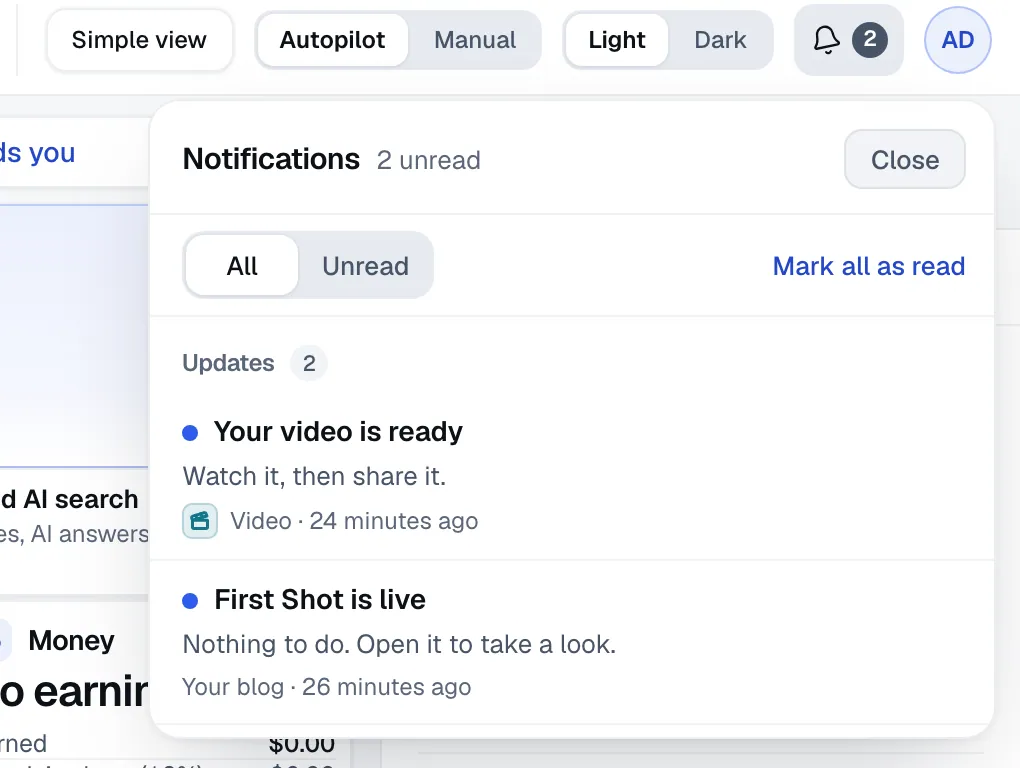
    You get a notice when it is live. Read the articles, change a setting, ask PlumiaAI, the assistant built into the console, for something, or switch to Manual mode so each new article after the first three waits for your OK.

    The notifications list in the console: a notice that the blog is live (nothing to do, open it to take a look) and a notice that a video is ready.

What it does for your blog

These are screens from the product, captured as they are. Each one is work Plumia does so you do not have to.

It chooses what to write from data, not from a guess

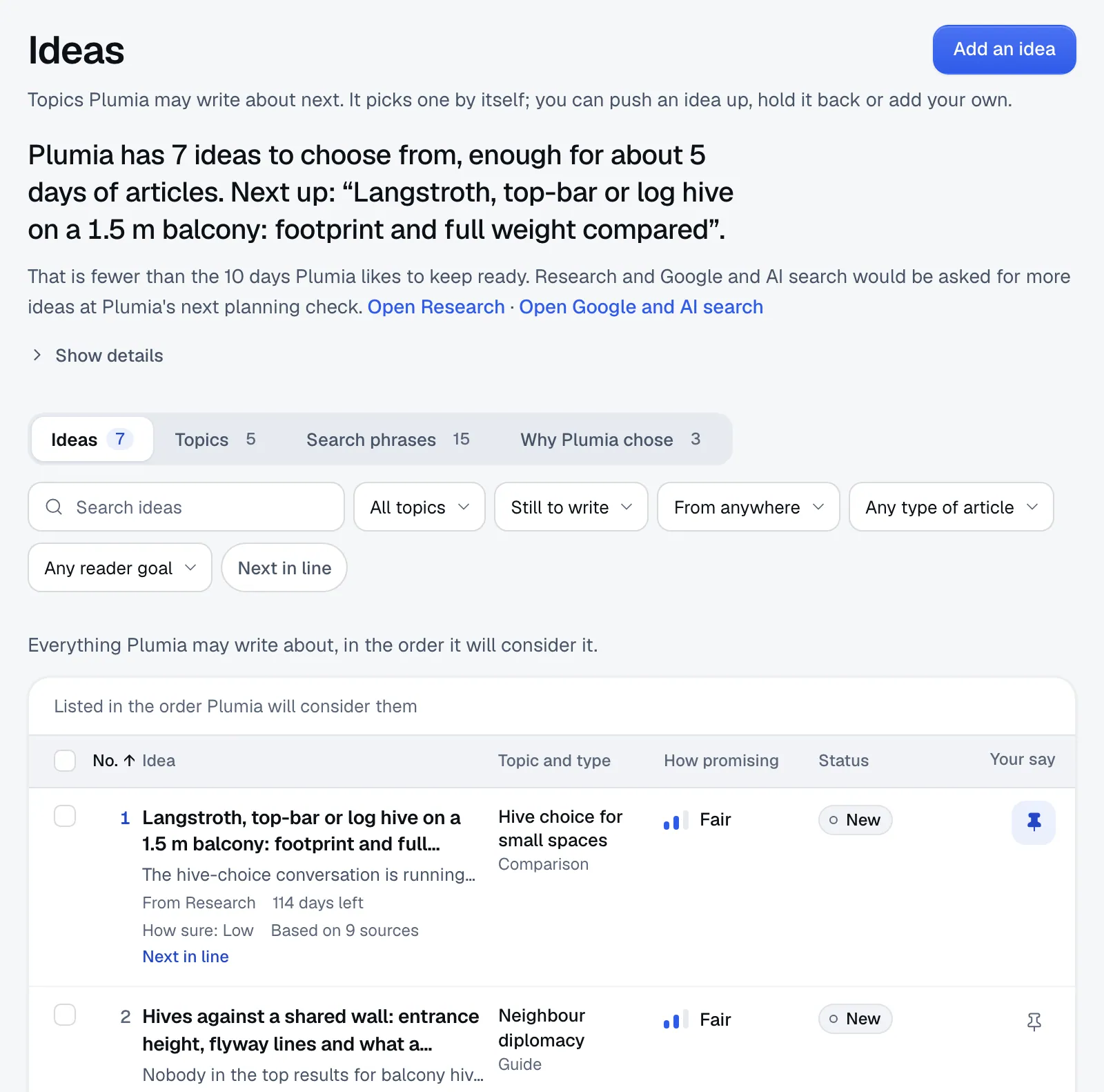
Research follows the accounts and topics people use in your subject. Google and AI search tracks the phrases people type and the answers AI tools give. A planner scores every idea from that evidence and records why it picked one.

A signal Plumia could not measure shows as n/a. It is never filled in with a guess.

The Ideas screen: article ideas Plumia may write next, each with how promising it is, how sure Plumia is, how many sources it rests on and when it is good until.

From a second demo blog, about balcony beekeeping, which had a full deep-research pass behind it.

A schedule that runs itself, and shows its work

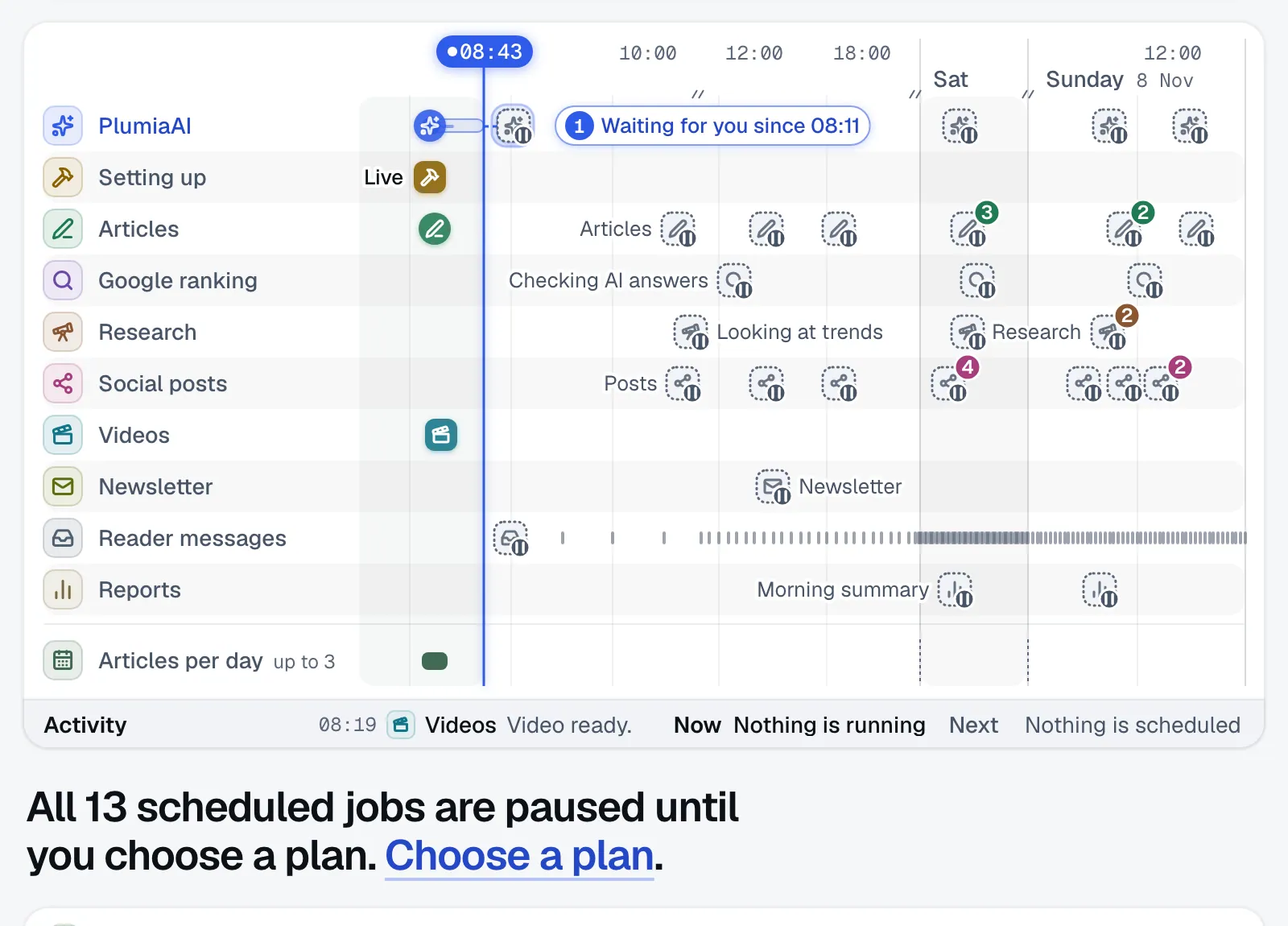
Every blog gets a schedule for articles, research, Google checks, social posts, the newsletter, reader messages and a morning summary. Each row says what is done, what is running, what is waiting for you and what was held back.

The schedule starts when you choose a plan. Until then it is built and paused.

The Schedule screen: a timeline with one row for each kind of work (articles, research, Google checks, social posts, videos, newsletter, reader messages, reports) and whether each item is done, running, scheduled or waiting.

Every article is checked before it goes live

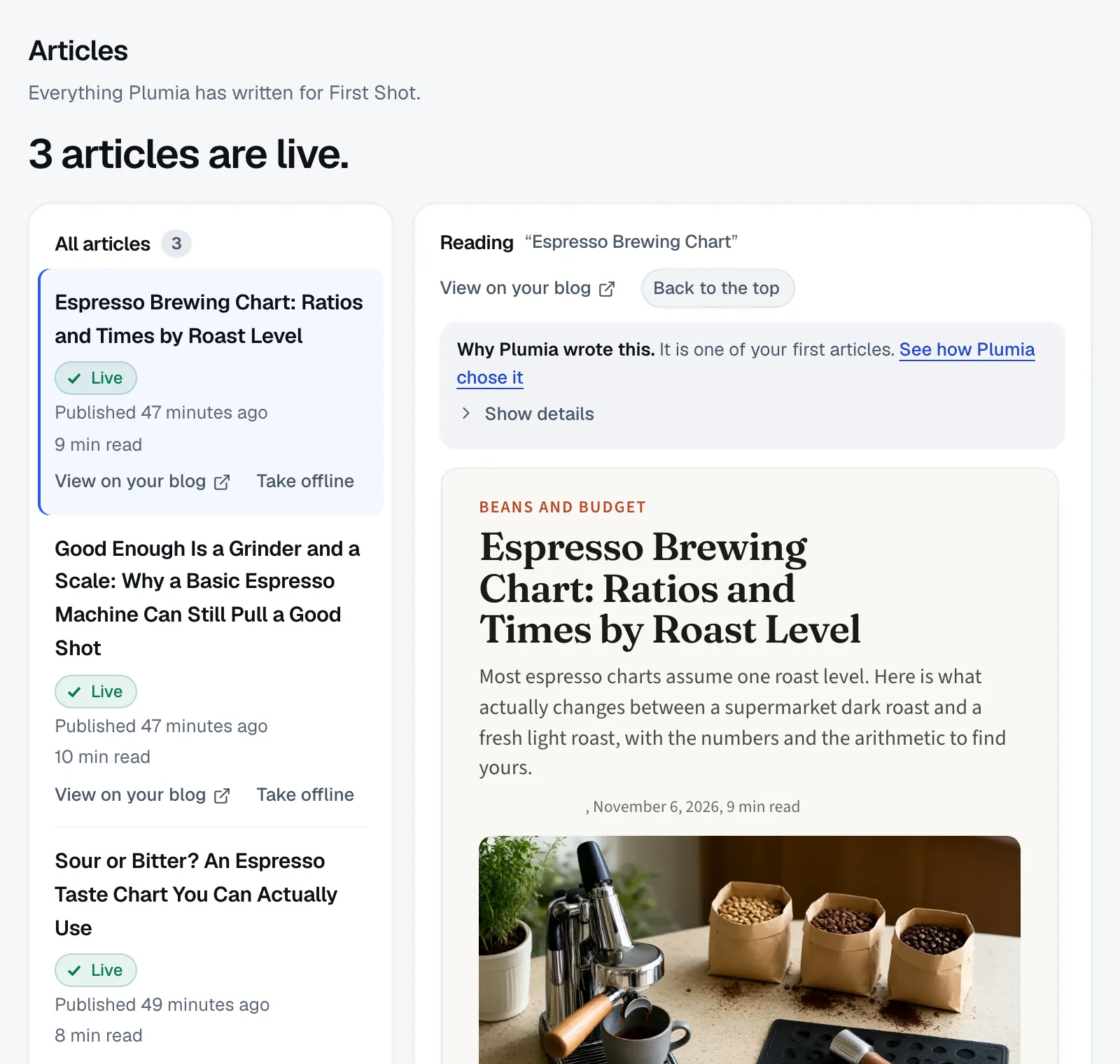
Each article is written from sources Plumia fetched, then read by an editor pass that checks the claims and fixes or removes the ones it cannot support. Articles the editor cannot clear wait for you, with the reasons.

The Articles screen: the list of three live articles on the left with their reading times and when they were published, and one article open on the right with its title, cover picture and the start of its text.
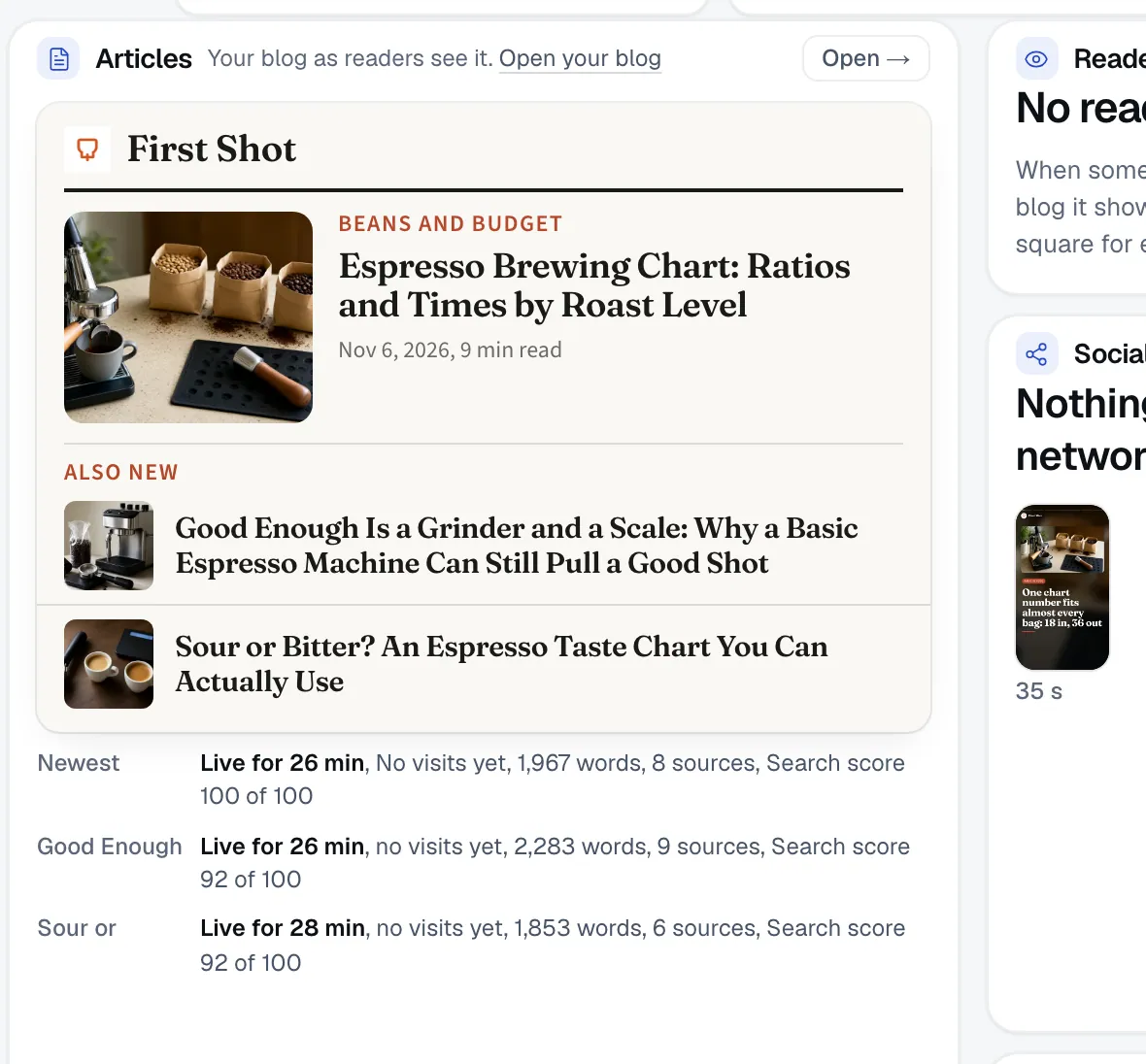
The Articles panel of the console: the front page of the blog as readers see it, and under it one line for each article with how long it has been live, its words, its sources and its search score out of 100.
  • Sources and claimsStatements without a source are flagged, not smoothed over.
  • A search scoreEach article gets a score out of 100 from a checklist: title and description length, main keyword, headings, internal links, sources, FAQ, cover alt text and length.
  • Your sayAutopilot publishes what passes. Manual holds each new article for your OK, after the first three.

Posts where your readers are

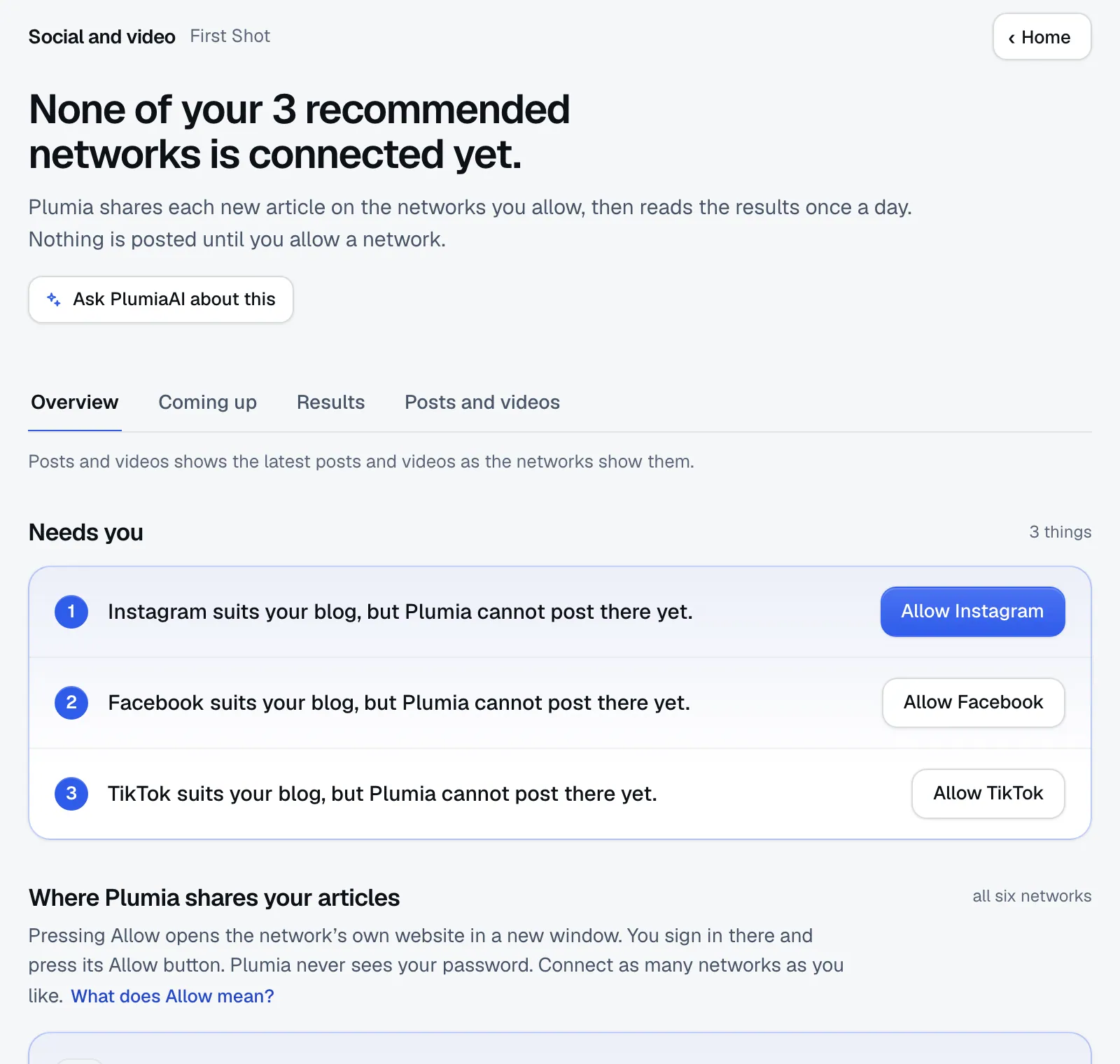
Plumia reads your title and subject and recommends two or three of X, LinkedIn, Facebook, Instagram and TikTok, each with a one-line reason. You can connect any of those, and YouTube Shorts too. Nothing posts until you approve the connection on the network's own screen. Instagram needs a Business or Creator account and Facebook a Page.

The Social and video screen: a headline saying none of the three recommended networks is connected yet, tabs for Overview, Coming up, Results and Posts and videos, and a list of the networks Plumia recommends for this blog (Instagram, Facebook and TikTok) with an Allow button for each.

TikTok posts arrive in your TikTok inbox as drafts, and YouTube Shorts stay private, until the posting service passes TikTok's and Google's reviews.

Short videos from your articles

A standard video is vertical, about 35 seconds, in your blog's fonts and colours with captions, and renders in under a minute. This one was made from one of the demo blog's articles, while the demo account was on a paid plan: the free preview includes no videos. Premium videos use an outside video service, and the two renders we timed took 18 and 35 minutes.

A frame from a short vertical video Plumia made from an article: the blog's logo and name at the top, a photo, and a caption card with a numbered point from the article in the blog's own fonts and colours.

A newsletter and a reader inbox

Plumia writes and sends the newsletter and welcomes new subscribers. Readers write to your blog's own address. Plumia replies to questions it can answer from your articles when the sender checks out. Sponsorship offers, sensitive mail and anything unverified wait for you, often with a draft. You can turn automatic replies off.

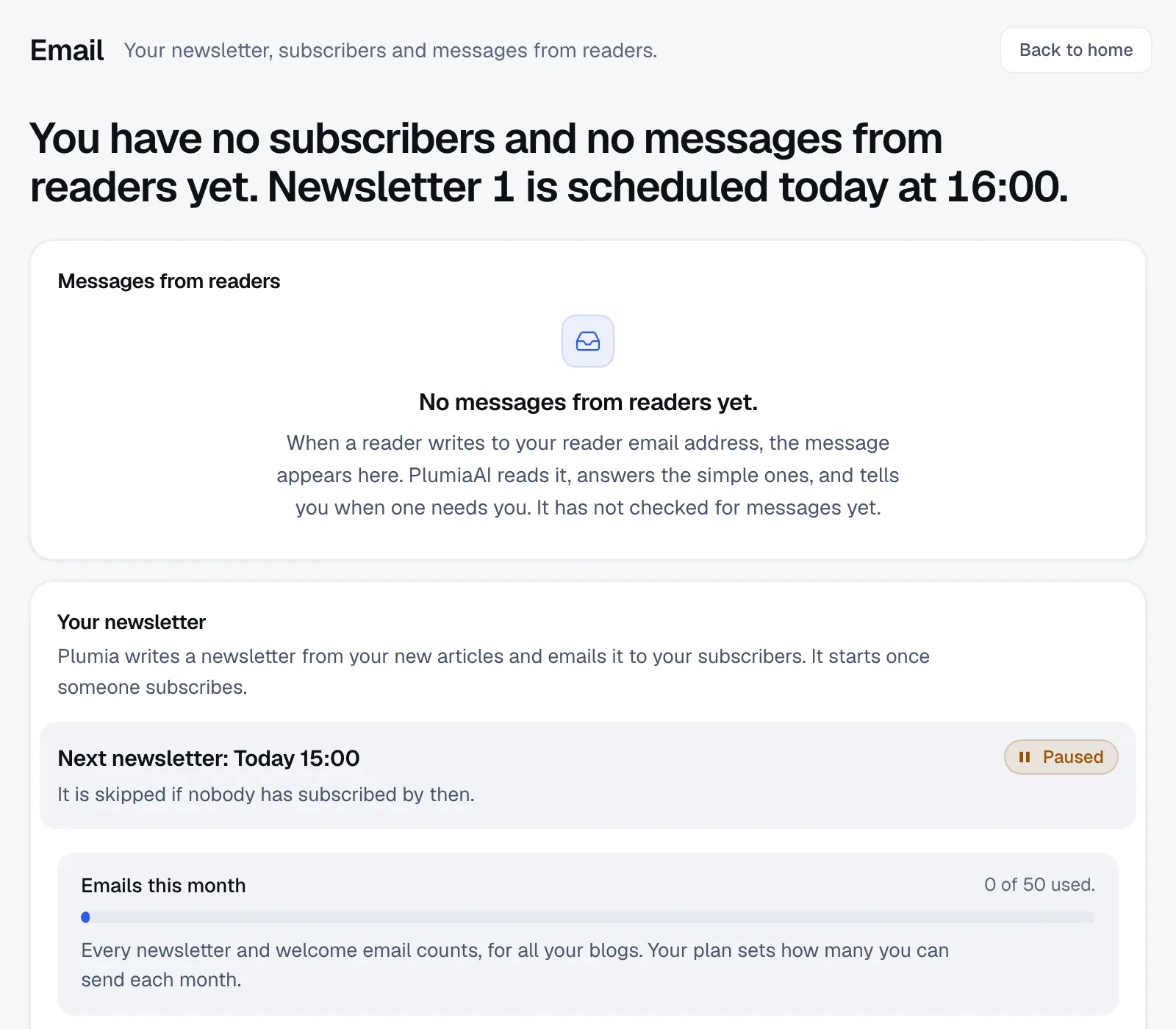
The Email screen: a headline saying there are no subscribers and no messages from readers yet, an empty box for messages from readers, and the newsletter section showing the next issue as paused, with the month's email allowance at 0 of 50 used.

Your own web address

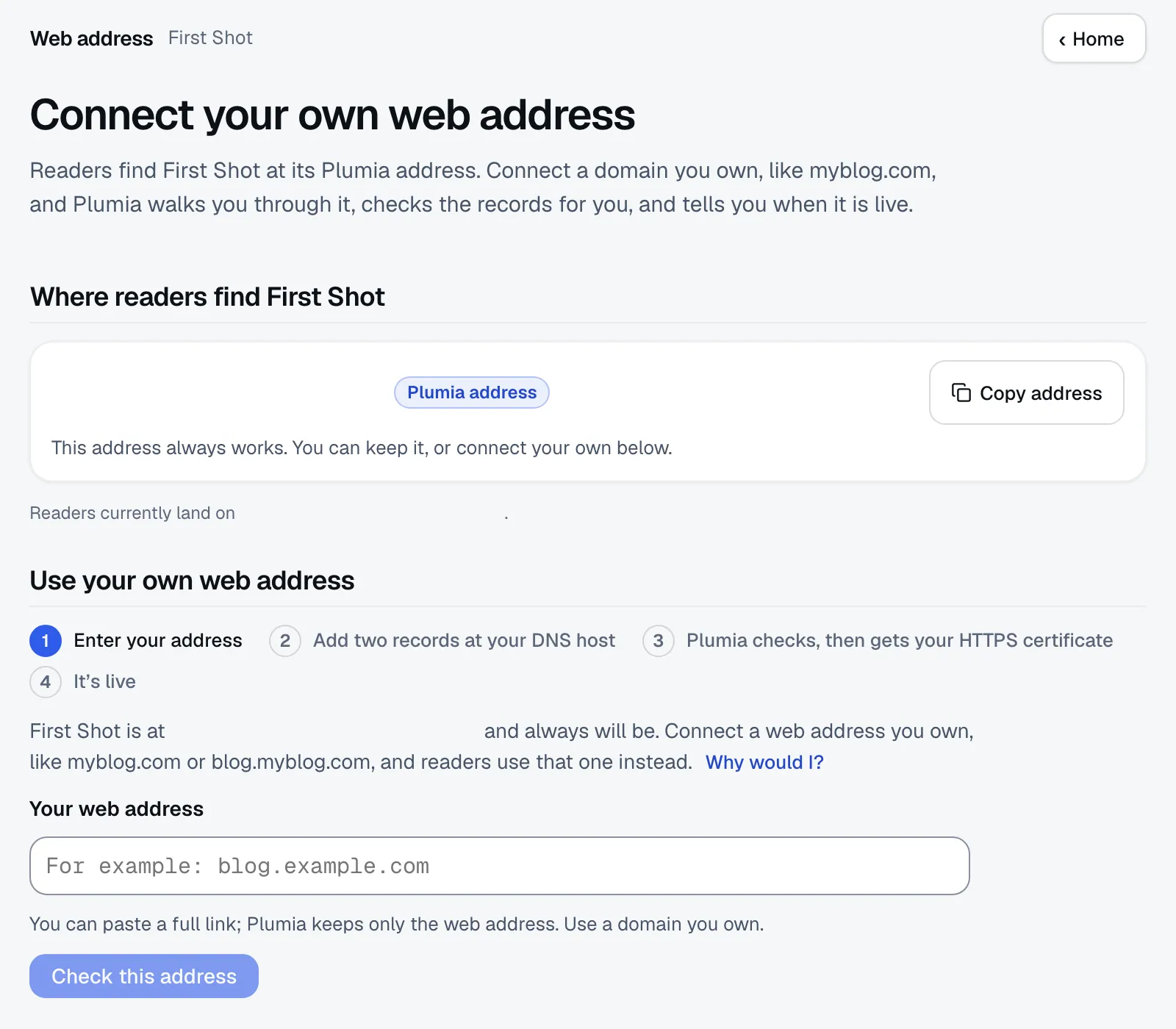
A guided page tells you which records to add at your DNS host, checks them for you, and switches the domain on only after it proves you own it.

The web address page: where readers find the blog today, and the steps to connect a domain you own: enter the address, add two records at your DNS host, Plumia checks them and gets the HTTPS certificate, then it is live.

AdSense readiness and site trust

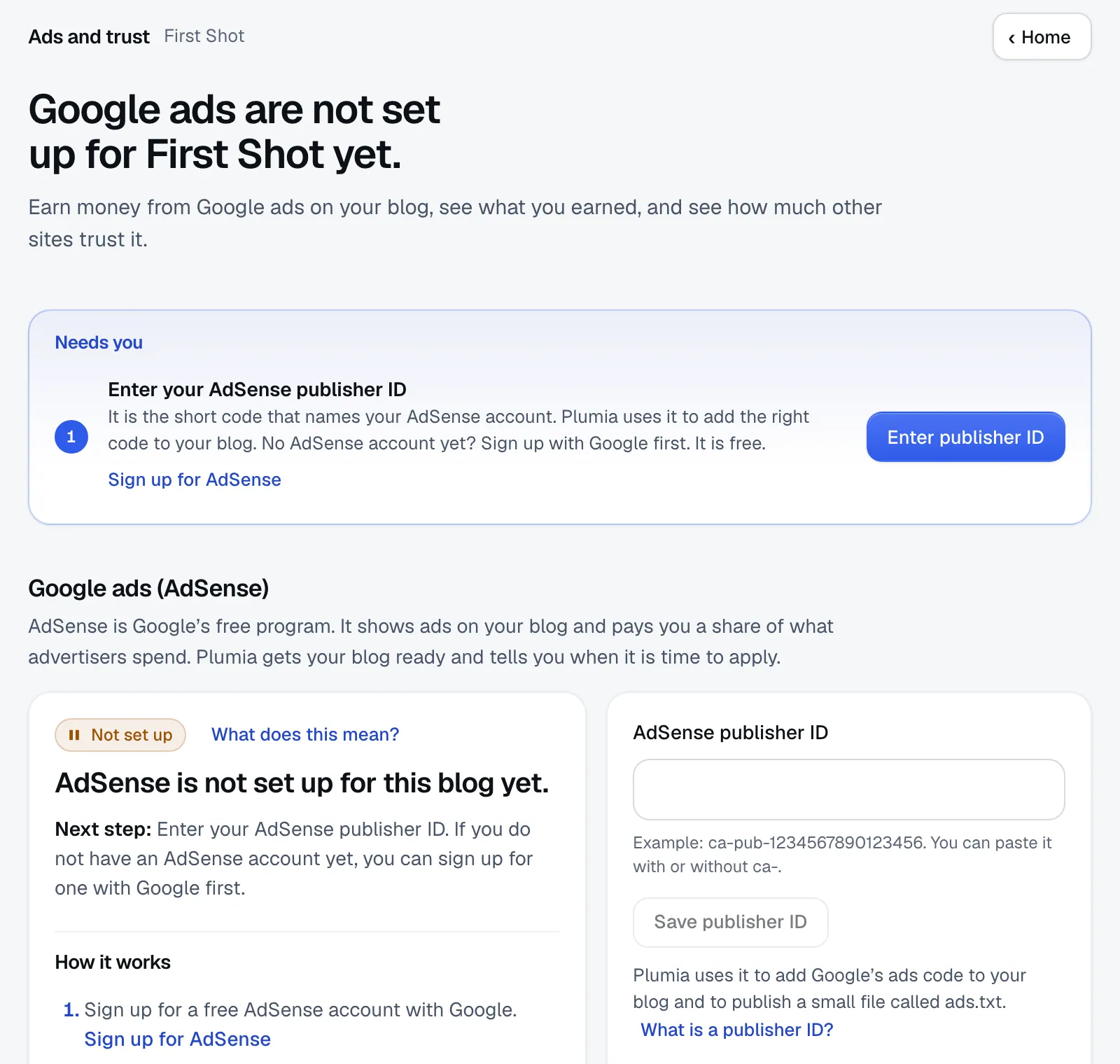
A checklist shows what is in place: the AdSense code, the ads.txt file, the About, Contact and Privacy pages, and Plumia's own bars of 15 articles and 14 days. Google sets no minimum. With a plan, a weekly read shows the blog's domain strength and who links to it. Approval and earnings are Google's.

The Ads and trust screen: a headline saying Google ads are not set up for the blog yet, a step to enter an AdSense publisher ID, and the AdSense section with its status, its next step and the publisher ID box.

Ask in plain words. It keeps working while you are away.

In the Simple view you tell PlumiaAI what you want, like “get my new blog going”. It works on it in the background for minutes or hours, within a step and cost budget, and picks up where it stopped if the page is closed.

The chat asks you before it sends an email, posts outside the schedule or uses part of your plan, such as a premium video.

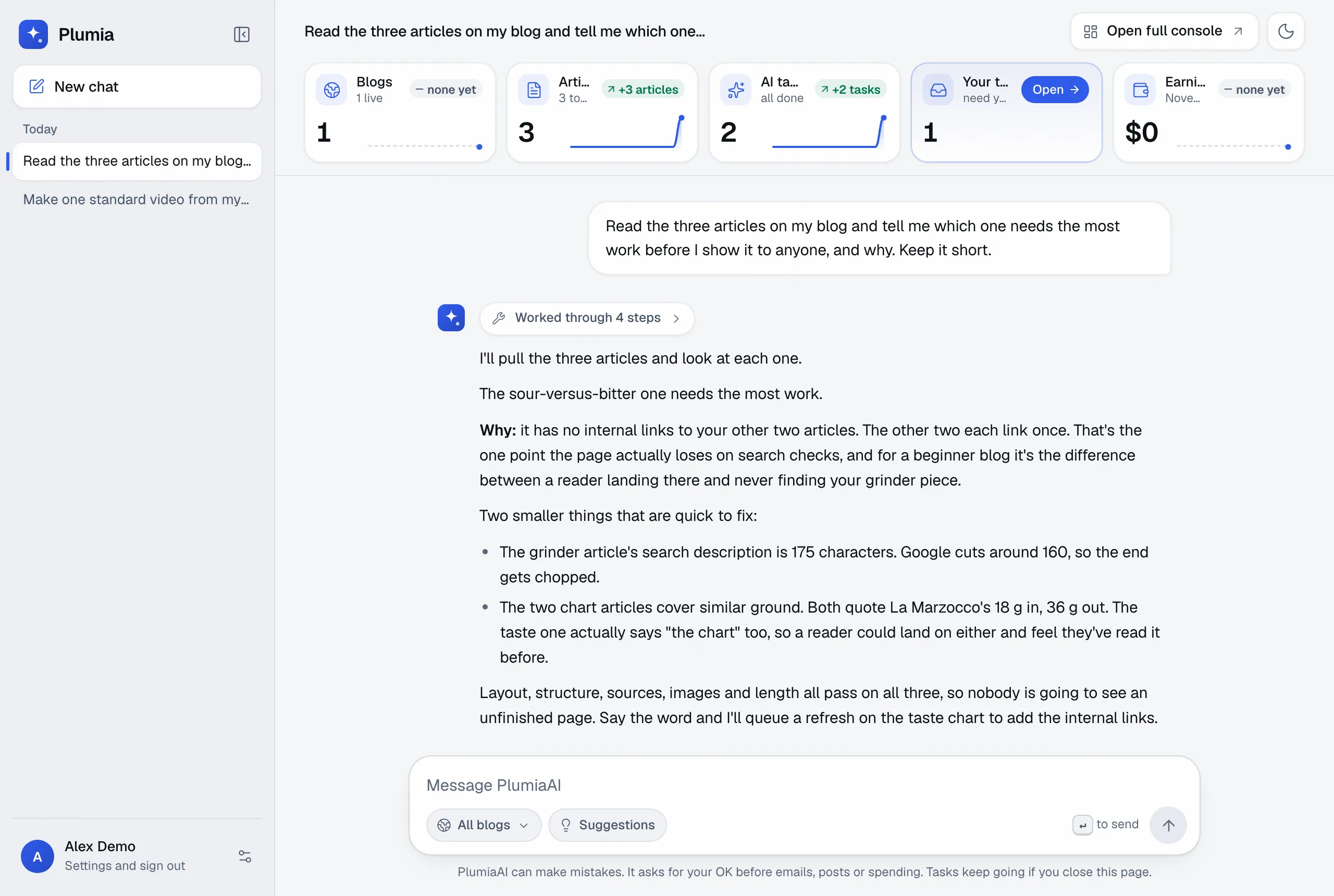
PlumiaAI in the Simple view, answering a question about the demo blog: it read the three articles and their checks and says which one needs the most work and why. Five numbers across the top show blogs, articles, AI tasks, your tasks and earnings.

A real answer about the demo blog. A bigger goal runs the same way, in the background.

Built to stay on the right side of Google, and of readers

Google says it judges pages by whether they help people, however they were made. Mass-producing thin pages to game rankings is spam, written by a person or by AI. Plumia has safeguards aimed at that.

  • It starts slowly.After its first three articles, a new blog publishes at most one a day for 14 days, then at most half its daily target (rounded up) until day 28. Plan limits are ceilings, not targets.
  • It works from sources.Every article is researched from pages Plumia fetched, then checked by an editor pass that fixes or removes claims it cannot support.
  • You can stop it.Switch to Manual and each new article after the first three waits for your OK. Pause a task from the Schedule or a whole blog from My blogs. Every action is in the activity log.
  • The chat asks first.PlumiaAI asks inside the chat before it sends an email, posts outside the schedule or uses part of your plan, such as a premium video or paid research data.
Articles a new blog may publish each day after its first three, on a plan of 3 a day

Drawn from the same rule the writer follows. An owner can skip the slow start.

Start free. Pay when you want it to keep going.

The preview builds your blog and its first 3 articles with no card. A plan starts the daily schedule.

Starter

$49a month

  • Blogs5
  • Articles a day3
  • Social posts a day5
  • Emails a month10,000
  • Standard videos a month5
  • Premium videos a month2
Build my blog

Starts with the free preview.

Growth

$100a month

  • Blogs15
  • Articles a day9
  • Social posts a day15
  • Emails a month30,000
  • Standard videos a month15
  • Premium videos a month6
Build my blog

Starts with the free preview.

Scale

$200a month

  • Blogs30
  • Articles a day18
  • Social posts a day30
  • Emails a month60,000
  • Standard videos a month30
  • Premium videos a month12
Build my blog

Starts with the free preview.

One allowance, shared

Each limit covers all your blogs together. With several blogs, a daily limit is split between them, and when there are more blogs than daily articles they take turns.

A ceiling, not a target

On every plan, after its first three articles, a new blog publishes at most one a day for two weeks. The plan is the most Plumia will do, and it does less when that is better for the blog.

At a limit, work is skipped

Plumia skips that kind of work until the next reset (daily limits at 00:00 UTC, monthly on the 1st) and carries on at the next slot. Nothing is billed on top of your plan, and work that fails inside Plumia does not count.

What the preview includes

1 blog, 3 articles in total, up to 50 emails a month and no videos. The schedule is built and paused until you choose a plan.

What you would otherwise do yourself

Most AI blogging tools write articles. Running a blog also means choosing topics, publishing, promoting and answering readers.

Who does each piece of work: a typical AI article writer or Plumia
The workA typical AI article writerPlumia
Choose what to writeOften keyword and topic suggestions you pick fromA planner scores each idea from research and search data and records why it chose one
Write and check each articleThe tool drafts, you check and editWritten from fetched sources and checked by an editor pass; Manual mode holds new articles for your OK
Host and publish the blogUsually you, on WordPress or another siteHosted for you; your own domain is optional
Post to social networksYou, or another toolOn the networks you connect
Make short videosAnother toolFrom your articles
Send the newsletterAnother toolWritten and sent for you
Answer reader emailYouQuestions it can answer are answered; the rest waits for you

We read the home and pricing pages of 12 related products on 6 November 2026; 8 of them write blog posts. Some cover some of these rows, and none of those pages showed all seven. We did not test the products.

Questions people ask first

Answers about Google, quality, money, limits and leaving.

Will Google penalise AI-written content?

Google says it judges pages by whether they help people, however they were made. What it treats as spam is mass-produced pages meant to game rankings, whether people or AI wrote them. Plumia works from sources it fetched, runs each article through an editor pass, and after a blog's first three articles, publishes at most one a day for 14 days, then at most half its daily target until day 28. Nobody can promise how Google will treat a particular blog, and we do not.

Will the articles read like generic AI writing?

They can contain mistakes, as any AI writing can. Each article starts from research and cites its sources, then an editor pass checks the claims and fixes or removes the ones it cannot support. Articles the editor will not clear wait for you with the reasons. In Manual mode each new article waits for your OK. You are the editor of what goes out under your blog's name.

Will it bring traffic or make money?

It might, and nobody can promise it. A new blog takes months to gain search traffic. Plumia shows readers, subscribers and clicks long before there is any revenue. AdSense approval is Google's decision: Plumia checks that your blog is ready and tells you what is missing. Plumia takes none of what your own ad and affiliate accounts earn.

What do I have to do?

Type a subject, optionally a title, and create an account. Plumia builds the blog and tells you when it is live. After that you can read, approve or change things, or leave it to run.

What does the free preview include?

One blog, built by Plumia with its brand, logo, pages, search plan and its first 3 articles, with no card. The 3 articles are everything the preview ever writes. The daily schedule is created but paused until you choose a plan.

What happens when I reach a limit?

Plumia skips that kind of work until the next reset: daily limits reset at 00:00 UTC and monthly limits on the 1st. Skipped work is not queued; the schedule carries on at its next slot, and a newsletter goes to as many subscribers as the month's emails allow. Nothing is billed on top of your plan, and work that fails inside Plumia does not count against your limits. If a payment fails, your plan's limits stay for 7 days from the first failure, then the free preview's limits apply until the card is fixed.

Can I approve articles before they go live?

Yes, for every article after the first three. Switch from Autopilot to Manual and each new article waits for your OK. The first three are written during the preview build and go live as they pass the editor. In Autopilot, articles that pass the editor go live by themselves, and any the editor cannot clear wait for you. Manual holds articles only: social posts, the newsletter and reader replies have their own switches.

Who owns the content?

Under the Terms, the blogs, articles and media made for you are yours, and you are responsible for what is published under your name. Read the Terms for the full wording.

How do I cancel?

Open the billing page in the console. It opens Stripe's customer portal, where you can change or cancel your plan, and it shows the date a cancelled plan ends.

What happens with my social accounts and my data?

You connect each network on its own screen and Plumia never sees your password. Posts go through our posting partner, treg, so its name appears on the network's consent screen. Plumia posts only to networks you connect. The Privacy page lists who processes data.

Can I use my own domain?

Yes: a bare domain, a www address or a subdomain. Every blog starts at your-blog.blog.plumia.xyz. A guided page lists the records to add at your DNS host, checks them for you and switches the domain on once it proves you own it. AdSense cannot approve the free address, so connect your own domain before you apply.

Can I run blogs for clients?

A plan covers 5, 15, 30 blogs on one account. There is one login per account, no client seats and no white label, so Plumia fits your own blogs better than client work today.
Start with a subject

Type it in. You will see your blog, with its first three articles, in about ten minutes.

Free preview. No card.

  • The preview needs no card.
  • Nothing is charged until you choose a plan.
  • Manual mode holds new articles for your OK.
  • You cancel from the billing page.